
Best Software for Personal Chefs in 2026 (Honest Comparison)

Most personal chefs run their business on a patchwork of Google Docs, spreadsheets, Venmo requests, and text threads. It works until it doesn't. Around client number five or six, the wheels start wobbling. Recipes live in three places. Grocery lists are wrong. You forget a client's allergy. An invoice goes unsent for two weeks.
Software exists to fix this. The hard part is picking one, because nothing was built for personal chefs until recently. Most tools on the market were designed for restaurants, large caterers, or generic freelancers. They'll get you halfway there, but you'll spend the other half building workarounds.
I looked at every tool personal and private chefs are actually using right now. No affiliate links in this post. No sponsored placements. Just an honest breakdown of what works, what doesn't, and who each tool is actually built for.
What Personal Chefs Actually Need From Software
Before comparing tools, it helps to know what you're comparing against. Most personal chefs need software to handle at least some of these:
- Client management: Track who your clients are, what they like, what they can't eat, and when they need you.
- Recipe and menu management: Store recipes, scale them up or down, and build menus for different clients.
- Grocery list generation: Turn a week's worth of menus into one consolidated shopping list.
- Food costing: Know what each dish actually costs you to make so you can price with confidence.
- Proposals, contracts, and invoicing: Send professional quotes, get signatures, collect payment.
- Scheduling and calendar: See your week at a glance across all clients and events.
No single tool does all of these equally well. The question is which gaps matter most for how you run your business.
The 8 Tools Compared
1. Traqly
What it is: An AI driven operating system built specifically for private and personal chefs. Covers the full chain from recipes to grocery lists to client management to invoicing.
Best for: Personal chefs who want one tool instead of five. Especially strong for chefs who do both weekly meal prep and private events.
Key features: Recipe management with automatic ingredient scaling, recipe-to-grocery-list generation, client CRM with dietary preference tracking, event and proposal management, invoicing through Stripe, and an AI copilot (Ask Traqly) that helps with menu planning and event prep.
Pricing: Starter at $49/month ($39/month if paid annually), Core at $89/month ($74/month if paid annualy). 14-day free trial.
The honest take: Full disclosure: Traqly is our product. It's in final development and launching soon. We're including it because it solves problems the other tools on this list don't. The recipe-to-grocery chain is the standout feature: you build a menu, and Traqly generates a consolidated grocery list with quantities scaled to the right number of servings. The AI copilot (Ask Traqly) sits on top of all your data and actually does things for you: suggest menus based on a client's dietary restrictions, estimate food costs before you shop, build a prep timeline for a multi-client week, or answer questions about your own recipes and past events. It's not a chatbot bolted onto a dashboard. It reads your recipes, your clients, your costs, and works from there. No other tool on this list does that for personal chefs specifically. The core workflow (recipes, groceries, clients, invoicing) is built and ready. We're finishing up the final polish before opening it up.
Website: gotraqly.com
2. HoneyBook
What it is: A CRM and business management platform for freelancers and service-based businesses. Not chef-specific.
Best for: Chefs who primarily need proposals, contracts, invoicing, and scheduling. If the business side is your bottleneck and you handle recipes separately, HoneyBook is polished.
Key features: Customizable proposal templates, legally reviewed contract templates, invoicing with online payment, scheduling, workflow automation, client portal, QuickBooks integration.
Pricing: Starter at $36/month, Essentials at $59/month, Premium at $129/month. 7-day free trial.
The honest take: HoneyBook is beautifully designed and the onboarding is smooth. The proposal and contract workflow is the cleanest one I've seen. But it knows nothing about food. There's no recipe management, no grocery lists, no dietary tracking, no menu building. You're using a generic freelancer tool and building all the chef-specific stuff yourself. For photographers and event planners, it's perfect. For personal chefs, it's half the picture. No chef-specific AI. HoneyBook has an AI email composer, but it doesn't know anything about your recipes, your ingredients, or your food costs. It can help you write a follow-up email. It can't help you plan a menu.
Website: honeybook.com
3. Modernmeal
What it is: A meal planning and recipe management platform built for culinary and health professionals.
Best for: Chefs who are heavy on nutrition tracking and need detailed macro/micronutrient data for health-conscious or medical-diet clients.
Key features: Recipe importing (web scraping and CSV), automatic nutritional analysis, menu building with favorites and exclusion filters, serving labels, client summaries, production reports, grocery list generation, recipe scaling.
Pricing: Not publicly listed. 14-day free trial available.
The honest take: Modernmeal has been around for over a decade and the recipe management is deep. The automatic nutritional analysis is strong if your clients care about macros. Grocery list generation works. Where it falls short: no CRM, no invoicing, no contracts, no event management. It's a recipe and nutrition tool, not a business tool. You'll still need something else for the client-facing and financial side of your business. No AI features at all. You're doing all the thinking yourself, which is fine if your workflow is simple, but it means no help with menu suggestions, cost estimates, or prep scheduling.
Website: modernmeal.com
4. Private Chef Manager
What it is: A booking and business management tool designed specifically for private chefs. Includes website builder functionality.
Best for: Chefs who want a simple booking page and client request management. Especially useful if you don't have a website yet.
Key features: Client request management, scheduling, custom quote generation, website builder, menu showcase, and booking management.
Pricing: Not publicly listed. Charges a 2.9% service fee on transactions.
The honest take: Private Chef Manager is one of the few tools actually built for personal chefs, and it does the booking and scheduling side well. The website builder is a nice bonus if you're starting from scratch. The 2.9% service fee on every transaction adds up fast though. On $10,000/month in bookings, that's $290 gone. And like HoneyBook, there's no recipe-to-grocery chain, no food costing, no ingredient scaling. It handles the front-of-house (booking, scheduling) but not the back-of-house (cooking, shopping). No AI features. Everything is manual input and manual output.
Website: privatechefmanager.com
5. Perfect Venue
What it is: Event management software built for venues and private event professionals.
Best for: Chefs who focus primarily on private dining events, dinner parties, and catering. Not great for weekly meal prep chefs.
Key features: Event proposals and contracts, host communication, payment processing, BEO (banquet event order) management, event calendar, automated follow-ups.
Pricing: Basic at $79/month, Professional at $159/month. Free starter plan available. 14-day trial.
The honest take: If your business is 80%+ events and dinner parties, Perfect Venue is worth a look. The event proposal workflow is strong and the BEO management is something most other tools lack. But it's fundamentally an event tool. There's no recipe management, no grocery lists, no meal prep workflow. If you do weekly meal prep for recurring clients AND events, you'd need Perfect Venue plus a recipe tool plus a separate CRM. That's a lot of tabs. No AI copilot. You're building every proposal and every BEO from scratch each time.
Website: perfectvenue.com
6. Personal Chef Office (APPCA)
What it is: Online software provided by the American Personal & Private Chef Association. Free for APPCA members.
Best for: APPCA members who want a basic tool at no extra cost.
Key features: Client management, recipe storage, menu planning, grocery list generation, basic scheduling.
Pricing: Free with APPCA membership (membership runs ~$300-400/year).
The honest take: If you're already an APPCA member, this is free and covers the basics. The interface feels dated compared to newer tools, and the feature set is limited. No invoicing, no contracts, no AI features, no modern integrations. It works as a starter tool, but most chefs outgrow it once they're managing more than a handful of clients. It's included-with-membership software, not something you'd pay for standalone. No AI features. The tool does what it does and nothing more.
Website: personalchef.com
7. WorkQuote
What it is: A mobile estimating and invoicing app for service businesses, with a personal chef template.
Best for: Chefs who just need a faster way to send quotes and invoices from their phone. Bare-bones but functional.
Key features: Customizable estimate templates for meal plans and events, client scheduling, ingredient and labor cost tracking, itemized invoice generation, mobile-first design.
Pricing: Free basic tier. Paid plans available.
The honest take: WorkQuote solves one problem well: getting a professional quote in front of a client quickly. The mobile-first approach is nice when you're quoting a dinner party on the spot. But that's where it ends. No recipe management, no grocery lists, no CRM beyond basic contact info. It's a quoting tool, not a business platform. Fine as a supplement, not as your main system. No AI. What you type is what you get.
Website: workquote.app
8.Tripleseat
What it is: Event management and catering software built for restaurants, hotels, and venue-based caterers. Cloud-based, team-oriented.
Best for: Caterers who operate out of a physical venue and manage a sales pipeline of events. Not designed for solo personal chefs.
Key features: Event calendar with double-booking prevention, proposal and contract generation, BEO (banquet event order) management, 3D floor plans, kitchen sheets, PCI-compliant payment processing, analytics and year-over-year reporting, client portal.
Pricing: Not publicly listed. Industry sources put it around $99-149/month depending on users and features. Requires a demo call to get a quote.
The honest take: Tripleseat is solid if you run a catering company with a kitchen, a team, and a physical space. The event workflow and BEO management are mature. But it assumes you have a venue, a sales team, and multiple staff. There's no recipe management, no ingredient scaling, no grocery list generation, no food costing. If you're a personal chef cooking in clients' homes and managing your own shopping, Tripleseat doesn't address any of that. It's built for a different business model. You'd be paying for features you don't need while still missing the ones you do. No chef-aware AI. It can automate some follow-up emails, but there's nothing that touches your recipes, costs, or menus.
Website: tripleseat.com
9. Total Party Planner
What it is: Catering operations software that's been around since the mid-90s. Built by a caterer (John Cohen, originally for his parents' business), now used by catering companies globally.
Best for: Small to mid-size catering companies that manage multiple events per week and need proposal-to-invoice workflow with some recipe costing baked in.
Key features: Event management with custom fields, proposal and contract generation, CRM for leads and clients, menu recipe costing, inventory tracking, payment processing (credit, debit, ACH), staff scheduling, QuickBooks integration, mobile app, client portal.
Pricing: Nibble plan at $65/month (1 user, basic features). Feast at $165/month (2 users, advanced reporting). Delicacy at $365/month (3 users, full CRM, recipe costing, client portal, staff manager). Setup fees of $500-1,000 on top. Additional users run $20-25/month each.
The honest take: Total Party Planner is the closest thing on this list to a real operations platform for caterers. It has recipe costing, which most event tools skip entirely. The problem is it's event-centric. Everything revolves around individual events: proposals, BEOs, invoices per gig. If you're a personal chef with 8 recurring weekly clients and the occasional dinner party, the event-per-transaction model doesn't fit how you work. The learning curve is steep, the mobile app gets consistently poor reviews, and the pricing jumps fast once you need the features that actually matter (recipe costing is locked behind the $365/month Delicacy tier). For established catering companies doing $500K+ in events, it makes sense. For a personal chef doing $8-15K/month in meal prep and private dining, you're overpaying for the wrong tool. No AI features. For a tool that charges up to $365/month, you're still doing all the menu planning and cost estimation manually.
Website: totalpartyplanner.com
10. Generic Combo (Google Docs + Spreadsheets + Venmo)
What it is: The DIY stack that 90% of personal chefs start with.
Best for: Your first 1-3 clients when you're still figuring out your workflow.
Key features: Whatever you build yourself. Typically a recipe folder in Google Docs, a client tracker in Google Sheets, Venmo/Zelle for payments, and a paper list for groceries.
Pricing: Free (except your time).
The honest take: Everyone starts here and there's no shame in it. But the hidden cost is real. When a client changes their order, you're updating three documents. When you scale a recipe, you're doing math by hand. When tax season arrives, you're digging through Venmo history. The DIY stack holds up fine until it doesn't, usually at the worst possible time (a client dinner, a big event, a week with six clients). The point of dedicated software is avoiding that breaking point.
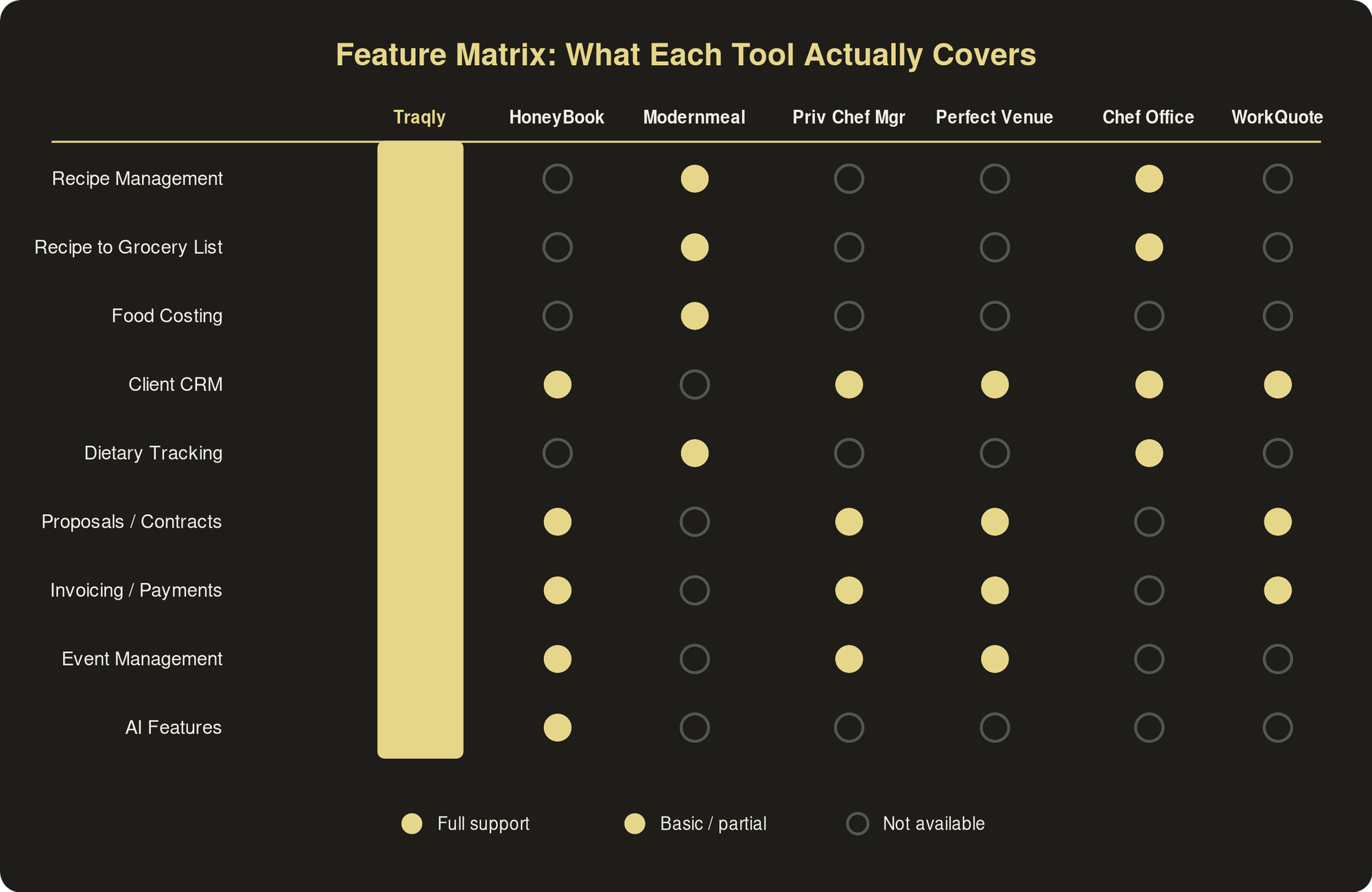
Side-by-Side Comparison
So Which One Should You Pick?
There's no universal answer, but here's a simple way to think about it:
If you want one tool for everything and you're tired of the Google Docs patchwork, Traqly is the only option on this list that covers recipes, grocery lists, client management, AND invoicing in a single platform built for personal chefs. It's launching soon, and you can join the early access list to be first in.
If you only need the business/financial side (proposals, contracts, payments) and you handle recipes in your head or on paper, HoneyBook is the most polished option. Just know you'll outgrow it as your client list and menu complexity scales.
If nutrition data is your core selling point and your clients pay you specifically for macro-tracked, dietitian-quality meal plans, Modernmeal is the strongest recipe platform. Pair it with HoneyBook or WorkQuote for invoicing.
If you only do private events, Perfect Venue handles the event lifecycle well. But if you also do weekly meal prep, it'll only cover half your work.
If you're brand new with 1-2 clients, start with the free tools. Use Google Docs and Personal Chef Office. Then switch to purpose-built software before client number five, when the spreadsheet walls start closing in.
The personal chef software market is still small compared to restaurant tech or generic freelancer tools. That's actually a good thing. The tools that do exist are being built by people who understand the specific workflow of cooking for multiple private clients every week. The gap between using the right tool and duct-taping together a DIY stack only gets wider as your business grows.
If you want to see how the recipe-to-grocery workflow actually works, check out our post on how smart chefs save 5+ hours a week with recipe-to-grocery automation. And if you're just getting started, our complete guide to starting a personal chef business covers everything from licensing to landing your first clients.
We built Traqly to solve the problems this post describes. Get early access.